dagger



A Python implementation for controlling Pluto Drone.
Installation
Installing the package from source
Get the latest source by cloning this repo:
git clone https://github.com/rohithvarma3000/dagger.git
Change to dagger folder:
cd dagger
Install the dependencies:
pip install -r requirements.txt
Install dagger:
pip install .
Examples
Connecting to Pluto
import dagger
Pluto_IP = "192.168.4.1"
Pluto_PORT = 23
pluto = dagger.PlutoConnection()
pluto.connect((Pluto_IP, Pluto_PORT))
Intiating the SetRawRc Object for Controlling the pluto Drone using the RC params
rc = dagger.SetRawRC(pluto)
Arming the drone
rc.arm_drone()
Disarming the drone:
rc.disarm_drone()
General Information
How to Use?
Refer to our tutorial to get started with dagger
Working Principles
Sockets
We connected to Pluto first by connecting our device to the drone’s hotspot, then we used TCP sockets to connect
to the drone using IPV4 scheme and socket library in python to do the same. The server iss hosted at 192.168.4.1:23
We sent the MSP Packet data encoded as bytes to pluto using sockets, the details about the packet is explained below.
MSP Packets
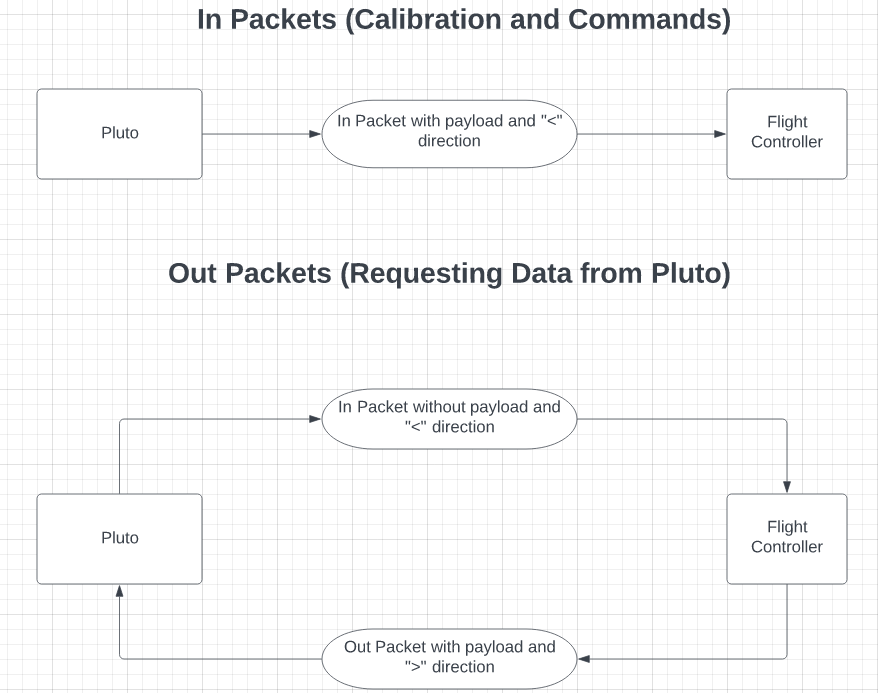
We used MSP Packet scheme to communicate with Pluto, ie send commands, request data and calibrate the drone. The data of the packet was first encoded into bytes and then sent as a byte stream (array of bytes) to the drone. The basic structure of the packet has been explained below.
Structure of the Packet
Header |
Direction |
Message Length |
Type of Payload |
Message Data |
Checksum |
|---|---|---|---|---|---|
2 Bytes |
1 Byte |
1 Byte |
1 Byte |
N Bytes |
1 Byte |
Details of the Packet
Type of Byte |
ASCII |
Hexadecimal |
|---|---|---|
Header |
$M |
0x24 0x4d |
Direction |
‘<’ or ‘>’ |
0x3c (to the drone) or 0x3e (from the drone) |
Message Length |
0x00 - 0xff |
|
Type of Payload |
0x01 - 0xff |
|
Payload |
Message Body encoded into N bytes |
|
Checksum |
XOR of Bytes of “Msg length”, “Command” and all bytes of “Payload” |